
See the product
What you actually install, and how you use it.
The whole product, start to finish. What arrives when you buy. How it gets onto your laptop. What it looks like on the screen. What you send, who you send it to, and what they do with it. Every screen below is the real program, photographed as it runs.
Step one
What arrives when you buy.
A download
One folder for your computer. You pick Mac or Windows at the checkout, and you are sent the right one.
A licence key
One line of text. You paste it in once. It is what takes the demonstration stamp off your records.
A page for your lawyer
Your record explained in evidence-law terms, with a certification paragraph you can adapt for a filing.
There is no account to create, and nothing to sign in to, now or ever.
Step two
Getting it onto your laptop.
Unzip the folder and put it wherever you keep your programs.
Double-click the file that starts it. A small program begins running on your own computer.
Your browser opens by itself, at an address only your own machine can reach. That page is being served by the program on your computer, not by a website.
Paste your licence key in once. That is the setup finished.
Step three
What you actually install.
This is the whole program. One page, three parts: what you declare, what you sign, and a place to check a record someone has sent you.
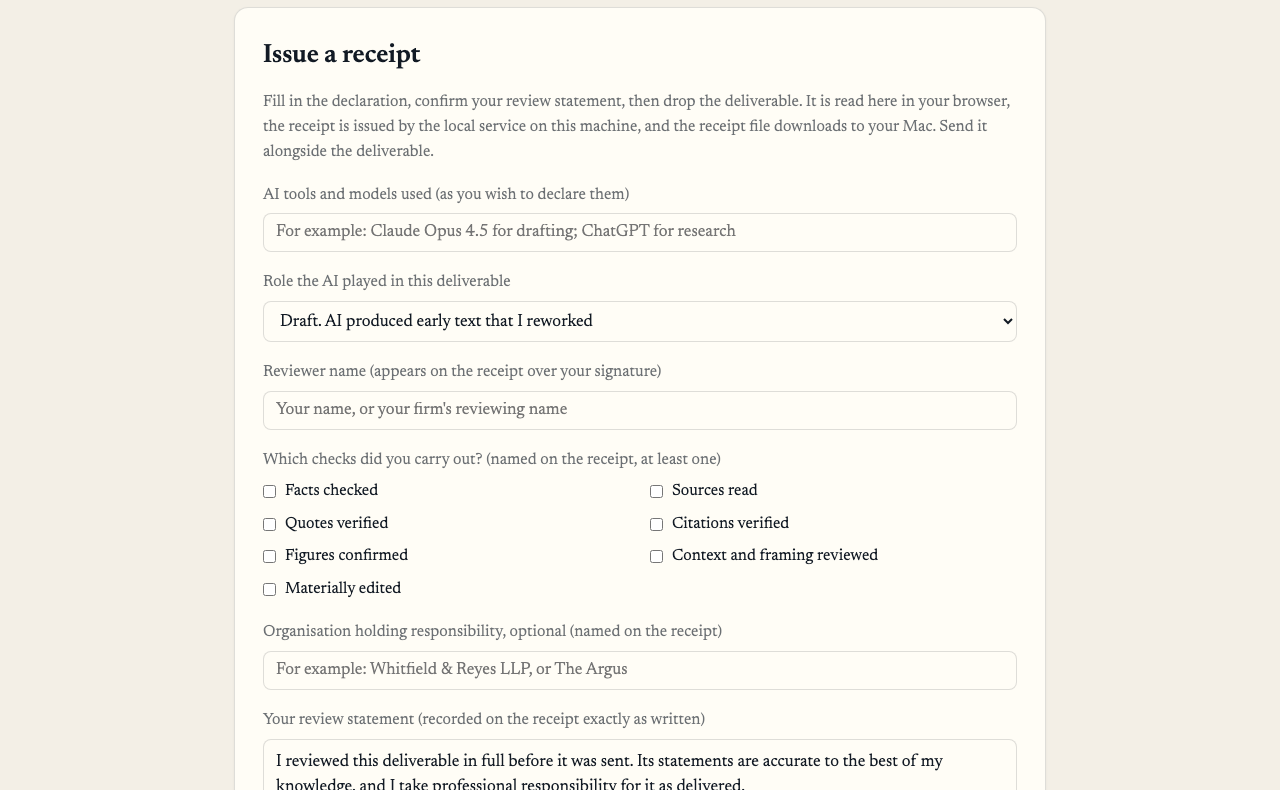
You name the AI, what it did, yourself, and the checks you carried out
You type in which AI you used, in your own words. You pick what it did from six choices: brainstorm, research, draft, edit, analysis, generation. There is no “other”, so the answer stays worth reading.
Then you tick the checks you actually carried out, from seven: facts checked, sources read, quotes verified, citations verified, figures confirmed, context and framing reviewed, materially edited. You must tick at least one. The program will not make a record for a review you cannot name.
Step four
Choose the time. Drop the file in.
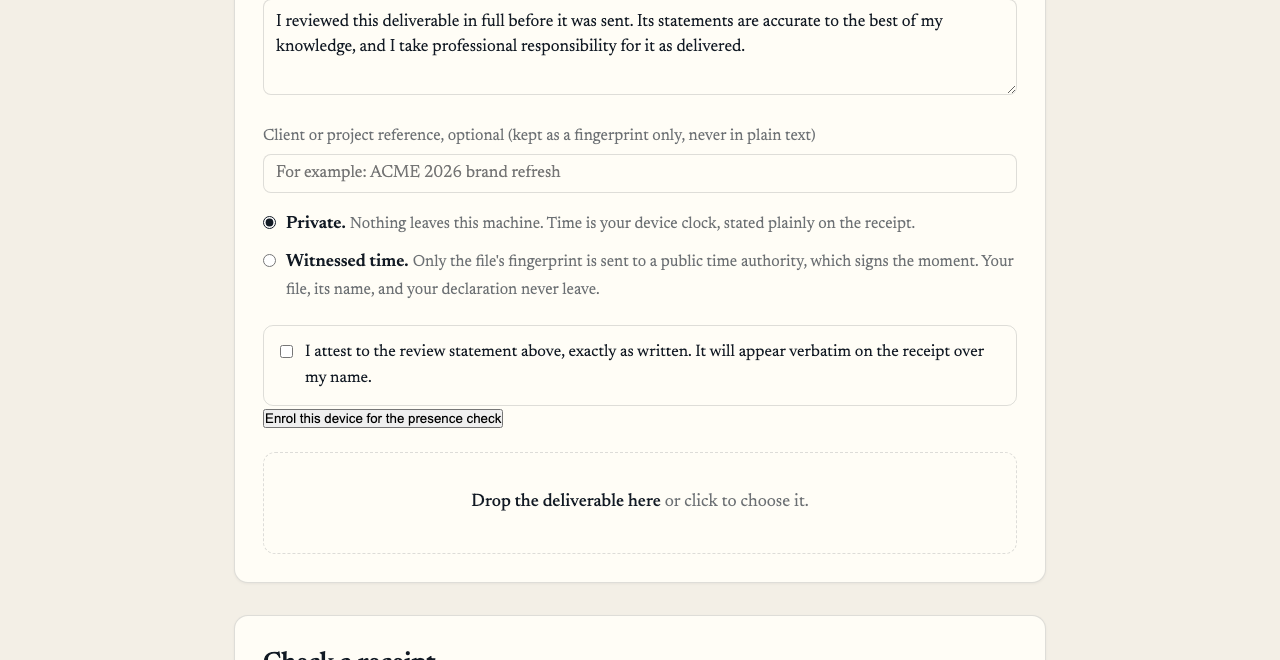
Your own words, the time, your signature, and the file itself
You write your review statement. It appears on the record exactly as you typed it, over your name.
Then you choose the time. Private uses your own computer’s clock, and the record says so plainly on its face. Witnessed sends only the fingerprint of the record to an independent public time authority, which signs the moment and sends it back. Your file, its name, and what you wrote never leave either way.
Last, you drop the finished document in. It is read on your own machine to work out its fingerprint, and it is never copied or stored anywhere. The record is signed and lands in your downloads as one small file.
Step five
What you send, and who you send it to.
What you send
Two files: your document, exactly as you were always going to send it, and the small record file beside it. The program also writes you a short paragraph for the covering email, so you do not have to explain it yourself.
Who you send it to
Whoever asked, or whoever might. Your client. The court, with the filing. Opposing counsel, when they raise it. Your broker at renewal. The same record answers all of them.
Your document is not changed and not wrapped in anything. It goes as it always did, with a receipt next to it.
Step six
Anyone who receives one can check it for free.
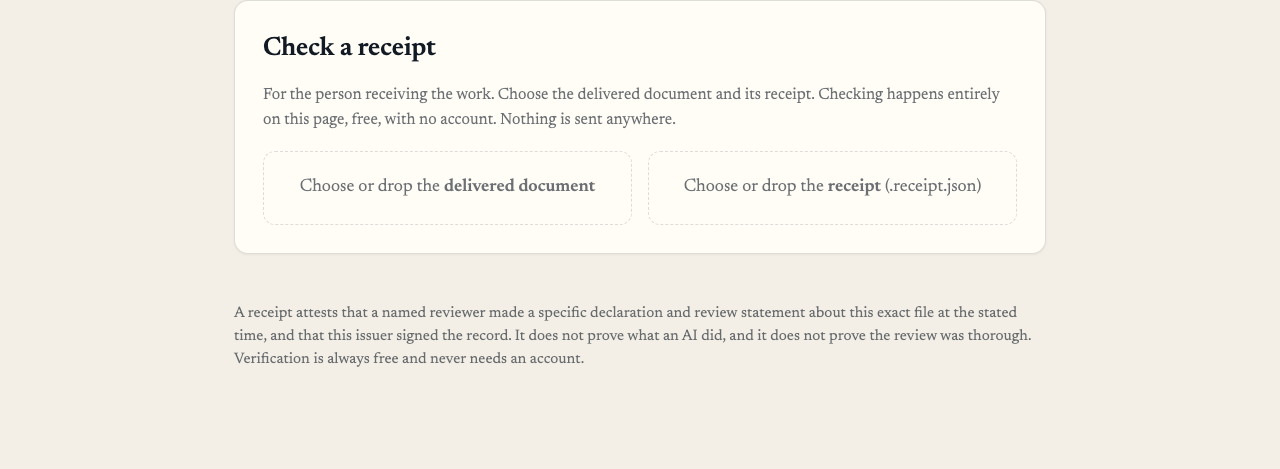
They drop in the document and the record, and get an answer in seconds
They do not need to buy anything, install anything, or make an account. They can use the free checker on this website, or the same program if they have it. It works with the internet switched off.
They see what you declared, whether the signature holds, what the time was and where it came from, and whether the document has changed since. They never see a word of the document itself.
If anything has been altered, by one character, the check refuses and says so.
Step seven
Where it lives.
Two places, both on your own computer
- The record itself, saved like any other file. Keep it with the matter and send it with the work
- A sealed copy, added to a running list on the same machine, so an entry that goes missing or gets altered shows up
- Each record is numbered and linked to the one before it, so a gap is visible
Nowhere else
- Nothing is kept on our side, because there are no servers in the path
- There is no account holding your records, so there is nothing central to break into or subpoena
- If you stop paying, every record you have already made keeps working forever, free, for anyone checking it
Your records
Can I search my records?
Not inside the program today. It does two jobs: it makes records, and it checks them. It does not yet give you a list of everything you have made, or let you search it.
In practice each record is an ordinary file sitting on your own computer, so your own machine finds them by name and by date the way it finds anything else. The running list on your machine can be checked from end to end at any time.
Asking a whole body of records questions in ordinary language is the Witness. That is a separate part of the estate, licensed separately, and it is not part of these plans. We would rather say so here than have you find out after paying.
Seven days free, then $349 a month.
You choose Mac or Windows at the checkout. $449 adds one check: human presence, a fingerprint or passkey tap that binds each seal to a named person who was there. Read how presence works.