
See the product
What you actually install, and how you use it.
See the complete workflow, from purchase and installation through record creation, sealing, sharing, and independent verification. Every screen below is taken from the working product.
Step one
What arrives when you buy.
A download
One folder for your Mac. It unzips and runs from where you put it.
A license key
One line of text. You paste it in once. It is what takes the demonstration stamp off your records.
A page for your lawyer
Your record explained in evidence-law terms, with a certification paragraph you can adapt for a filing.
There is no account to create, and nothing to sign in to, now or ever.
Step two
Getting it onto your laptop.
Unzip the folder and put it wherever you keep your programs.
Double-click the file that starts it. A small program begins running on your own computer.
Your browser opens by itself, at an address only your own machine can reach. That page is being served by the program on your computer, not by a website.
Paste your license key in once. That is the setup finished.
Step three
Create the Receipt.
One page, three parts: what you declare, what you sign, and a place to check a record someone has sent you.
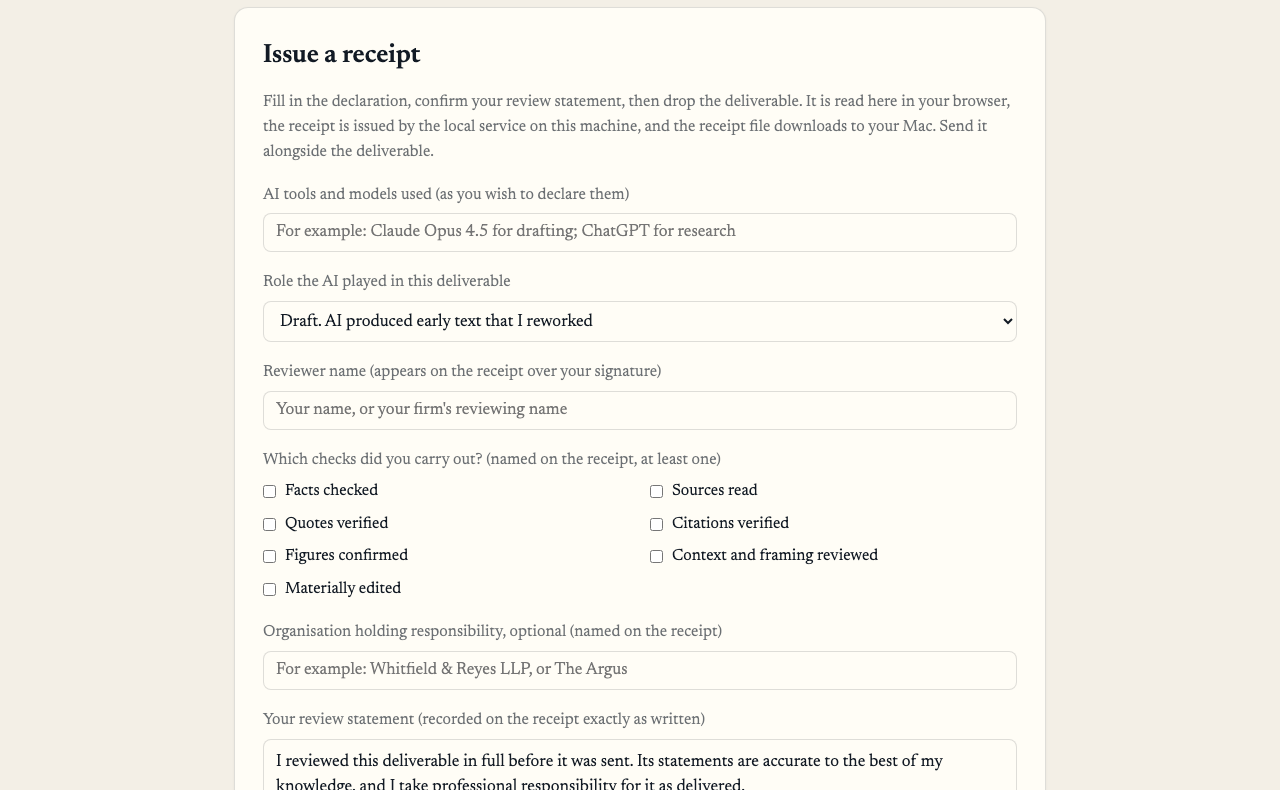
You name the AI, what it did, yourself, and the checks you carried out
Name the AI in your own words, and pick what it did from six choices. There is no “other”, so the answer stays worth reading.
Tick the checks you carried out, from seven. At least one is required. The program will not make a record for a review you cannot name.
Write your review statement. It appears on the record exactly as you typed it, over your name.
Choose the time. Private uses your own clock and says so on the record. Witnessed sends only the fingerprint to an independent time authority. Your file and your words never leave either way.
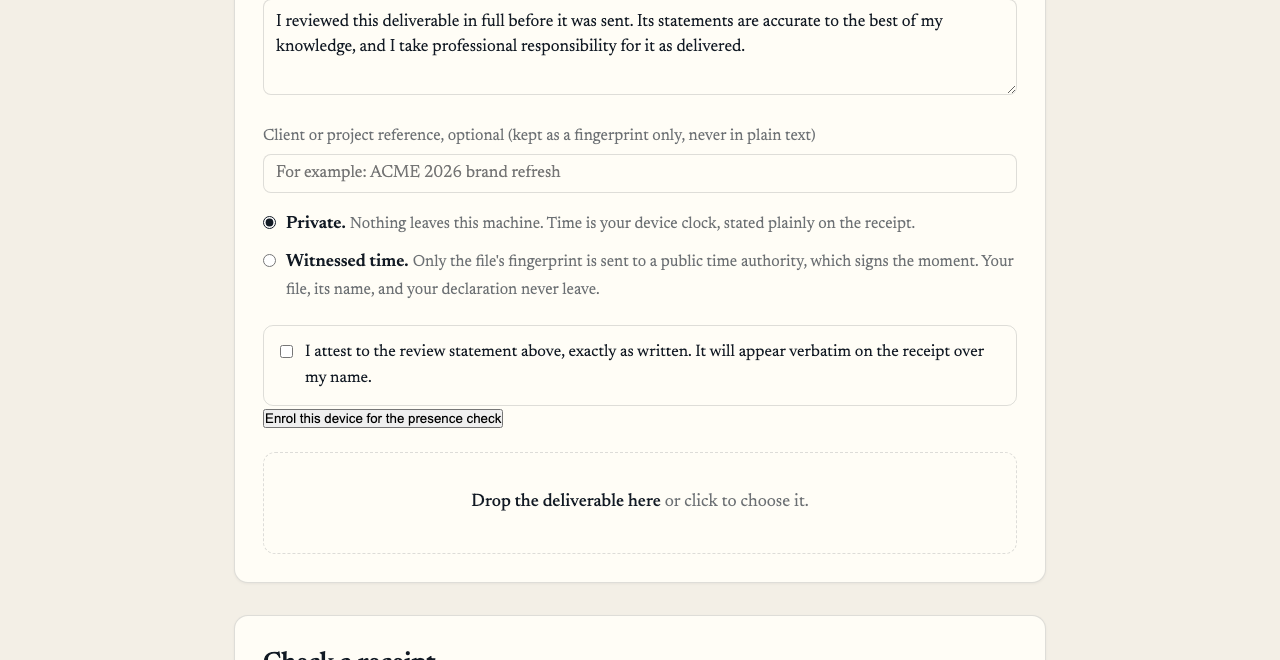
Your own words, the time, your signature, and the file itself
Then you drop the finished document in. It is read on your own machine to work out its fingerprint, and it is never copied or stored anywhere. The record is signed and saved to your Mac as one small file.
Step four
Where your Receipts are saved.
Each Receipt is saved on your Mac as a small file. Keep it with the matter, or find it later with Finder by name or date.
Two places, both on your own computer
- The record itself, saved like any other file. Keep it with the matter and send it with the work
- A sealed copy, added to a running list on the same machine, so an entry that goes missing or gets altered shows up
- Each record is numbered and linked to the one before it, so a gap is visible
Nowhere else
- Regulayer does not store your underlying work or your Receipt records on its servers
- There is no account holding your records
- If you stop paying, every record you have already made remains independently verifiable, free, for anyone checking it
Need to search and ask questions across an entire body of records? Witness adds that capability for firms. Ask about Witness →
Step five
What you send, and who you send it to.
What you send
Two files: your document, exactly as you were always going to send it, and the small record file beside it.
Who you send it to
Whoever asked, or whoever might. Your client. The court, if the filing rules or circumstances call for it. Opposing counsel, when they raise it. Your broker at renewal. The same record answers all of them.
Your document is not changed and not wrapped in anything. It goes as it always did, with a receipt next to it.
Step six
Anyone who receives one can check it for free.
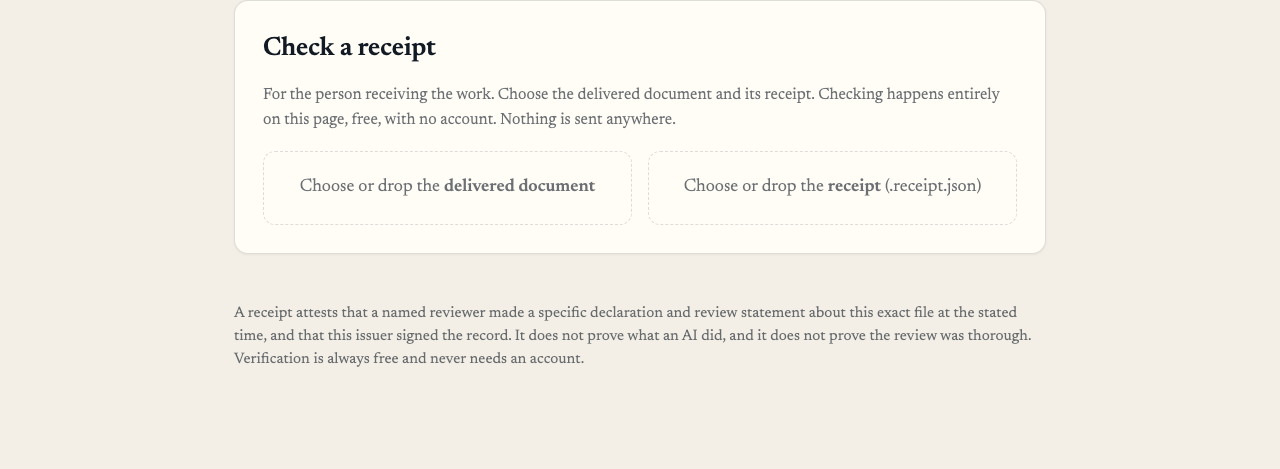
They drop in the document and the record, and get an answer in seconds
They do not need to buy anything, install anything, or make an account. They can use the free checker on this website, or the same program if they have it. It works with the internet switched off.
They see what you declared, whether the signature holds, what the time was and where it came from, and whether the document has changed since. They never see a word of the document itself.
If anything has been altered, by one character, the check refuses and says so.
Seven days free, then $349 a month.
Mac, in one download. $449 adds one check: human presence, a fingerprint or passkey tap that binds each seal to a named person who was there. Read how presence works.